Home / Channel design tips
Channel design tips
Above all, your channel should catch viewers' attention with interesting videos. Plenty of subscribers and high view counts will help you become popular on Bax.tv and earn through the partner programme.
Design your channel so that it attracts new subscribers, and keep making and uploading new videos.
Design your channel the way you like.
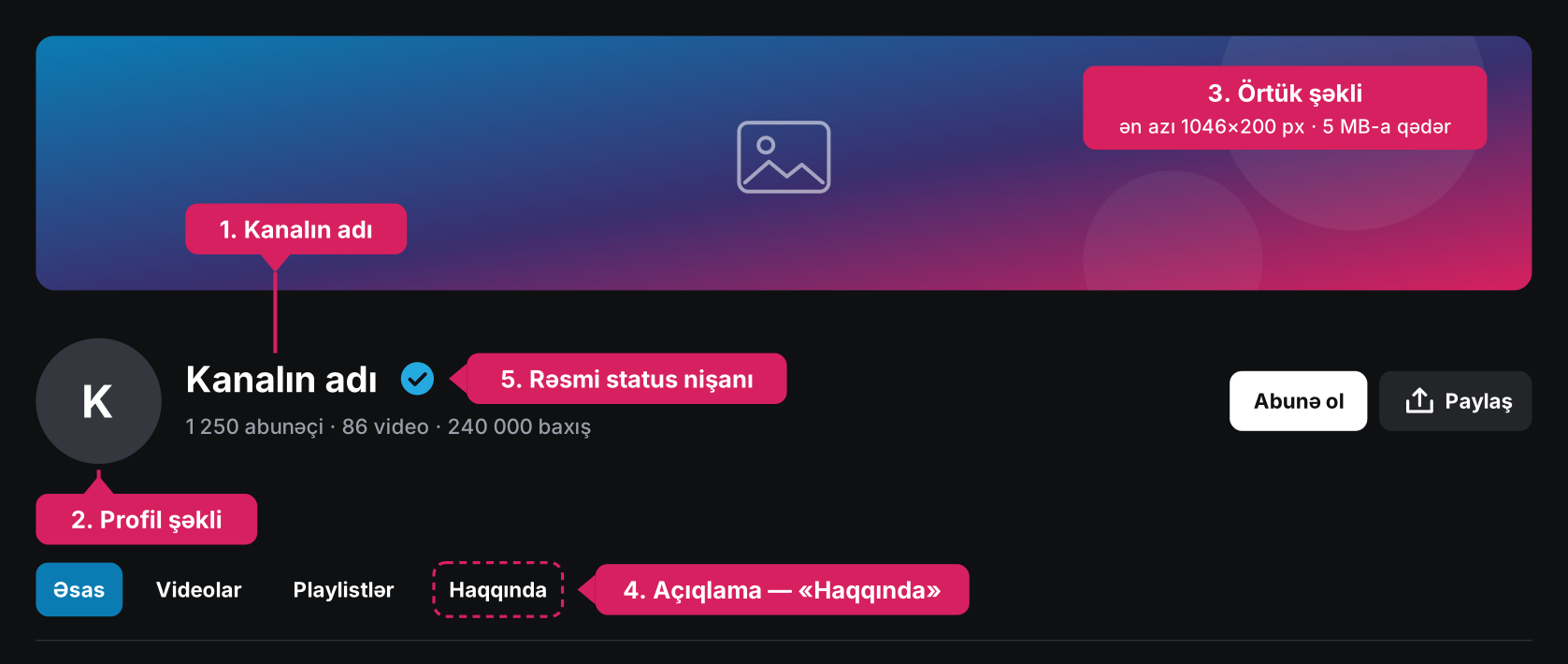
1. First, choose your channel's name
Your channel's name is shown not only on the channel page but also under every video, in the catalogue and next to your comments on other videos. It all starts with the first step: you don't want to stay a user with the number the system gave you at sign-up, do you?
2. Choose a profile picture (avatar) for the channel
If you represent an organisation, we recommend using its logo as the profile picture. If your video project has graphics or a logo made especially for it, use them so that your channel is easy to recognise and remember.
3. Upload a cover image for the channel
Users who have not chosen a cover image get one made by our designers. It is a nice picture, of course (otherwise we would not have uploaded it), but to attract subscribers and grow your popularity it works better to choose a cover that matches your channel's topic. If you have graphics you used for your website or social media accounts, or you represent a brand or company, we recommend using them in your Bax.tv channel's cover image.
File requirements: at least 1046×200 pixels and up to 5 MB; format: *.jpeg, *.png or *.gif. You can also choose the background colour of the channel's cover.
4. Add a channel description
Here you can tell people about your channel and the videos you have uploaded and plan to upload, attracting more subscribers and more views.
Your channel's design elements must not be "18+" and must not break the laws of the Republic of Azerbaijan. Other users can complain about your channel's design, and if their complaints are justified, the moderators will remove the inappropriate material from your channel.
5. Official channel status
You have probably noticed the official status badge next to the names of some channels. It shows that the user really holds the copyright to the videos published on their channel and that it is an official channel. You can find out more about official channels here.